Two water valves, and the shut-off is not the device's job
Hot water rules out almost every metering valve. Which one was left, what speaks against it — and why opening has two brakes while closing has none.
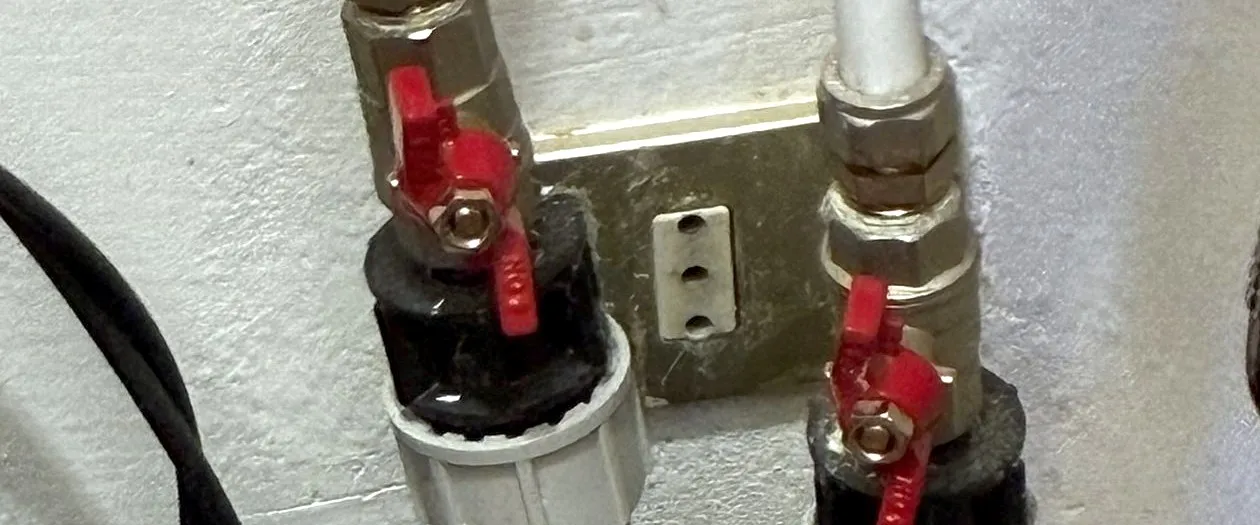
Since the end of October the Merano flat has two shut-off valves, one in the cold and one in the hot water line. They measure consumption and they can close.
The decision that shaped everything else was made before the purchase: shutting off is Home Assistant’s job, not the device’s.
That sounds like a side note. It made the device cheaper, because no standalone leak logic was needed inside the valve — and it made my system the single point everything hangs on. Both belong in the same sentence.
Three jobs, deliberately separated
| Job | who does it |
|---|---|
| Measure consumption | the valve itself, in litres, plus water temperature |
| Detect a leak | floor detectors, plus a plausibility check from the flow |
| Shut off | Home Assistant |
Put all three in one device and you buy an expensive device and get automation you cannot change. Separate them and you can replace each layer on its own — and you have to know that the middle layer is now yours.
The hot water line ruled out almost everything
This was the finding that settled the choice, and I had not seen it coming: ultrasonic consumption metering is mostly cold-water technology.
| Device | rejected because |
|---|---|
| Shelly / NEO NAS-WV02W | The manufacturer says so itself: cold water only, higher temperatures distort the measurement. The most expensive device in the field, 256 to 330 €. |
| Zemismart 214C | Zigbee2MQTT support only claimed by a dealer, not demonstrated. The existing entry applies via a Tuya gateway, not via my stick. |
| SONOFF Hydro ONE | An irrigation valve for a hose connection, not drinking-water fittings. And its built-in leak alarm reads “normal” on this firmware always. |
The most expensive device in the field was not the most suitable. It was the only one with drinking-water certification — and unusable for half of my pipes.
What remained was a PNI SV180 PRO. The reason is one line in the manual:
| Connection | DN20, 3/4″ |
| Water temperature | 0 – 120 °C |
| Supply | 5 V DC, 2 A |
| Protection | IP65 |
Plus a proportional valve rather than plain open/close, consumption in litres with daily, monthly and yearly curves, and a volume limit per draw and per day.
A side finding worth 32 euros
The device also exists as a “PLUS”, 32 € more, the newer model. The retailer attaches the manual of the PRO to that listing.
The word “PLUS” does not appear once in its 2,339 lines. No documentation of its own, not a single review. The older model had both.
What speaks against the device — in full
This belongs before the decision, not behind the result:
- No drinking-water approval. Across all ten language versions of the manual, none of the usual certifications appears, and the material in contact with the water is named nowhere. The retailer writes “metal” and “white plastic”. Deliberately accepted — but everybody should have read that line before ordering.
- No ready-made profile for the local connection. Without one you get a switch and nothing else. The shut-off works from day one, the metering does not.
- Contradictory supply specifications. Manual says 5 V, the sales page says “230 V or USB”. Either way you need power at the installation point — and a dry spot for the power supply, because IP65 covers the valve, not the plug.
- The manufacturer’s own warning: the product does not replace a classic shut-off device that works without the internet.
Point four is not boilerplate. More on that below.
Connected twice: local first, cloud as fallback
Both valves hang in Home Assistant twice. Locally over the direct connection in the house, and additionally over the manufacturer account.
That is not a contradiction of local operation, it is its backstop: the shut-off script tries locally first, takes the cloud as fallback, and then reports the actually measured state of both valves — not the one it requested.
The local connection needs two values from the manufacturer, read out exactly once. After that the account is not needed for operation.
That the assignment is right proves itself: without the correct key this protocol does not connect at all. Both connect — so each key sits on the right device.
And that it really is the hot water line is shown not by the label but by the measurement: 30 °C against 21 °C on the other one.
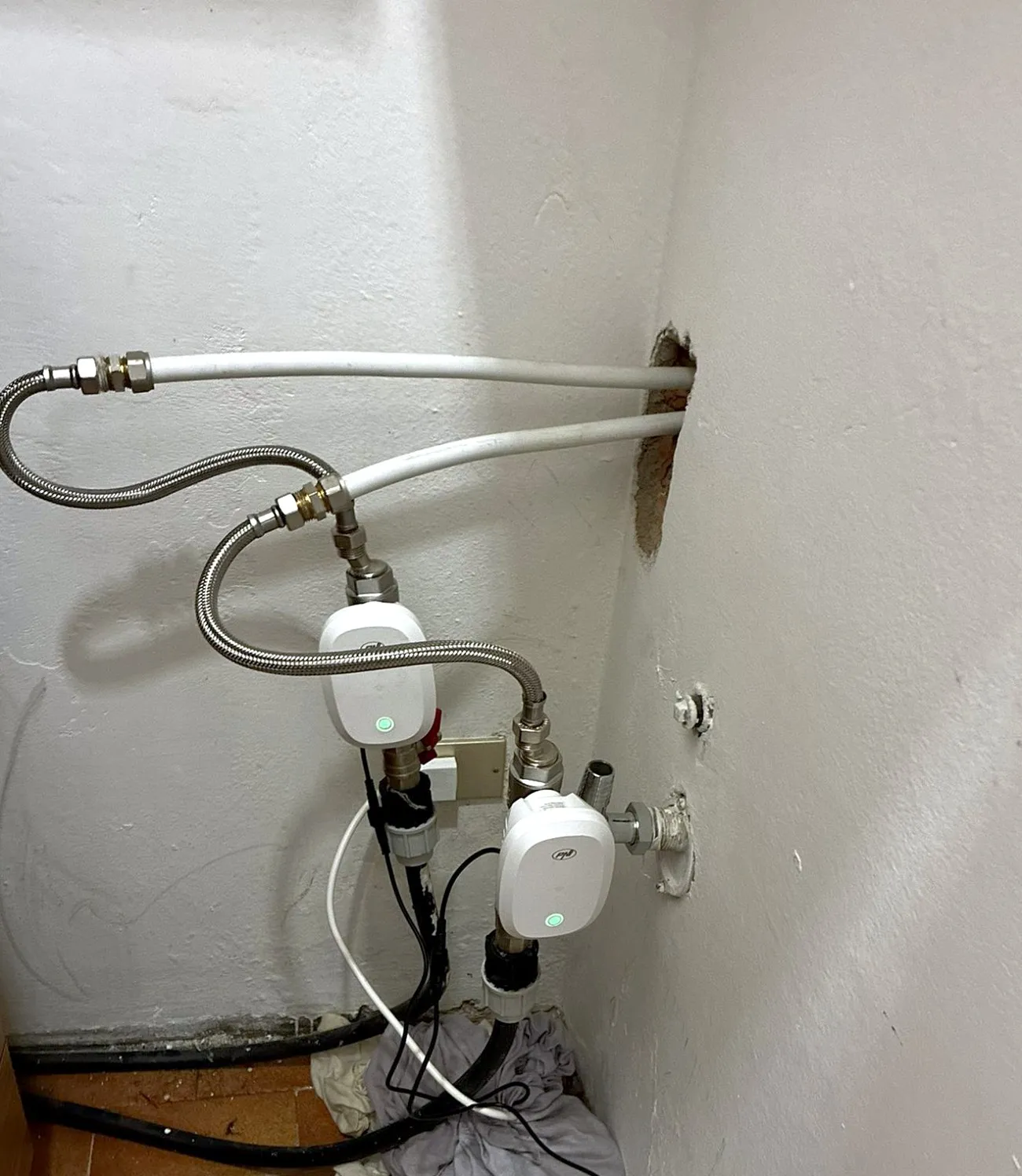
The installation point, one step further back. Where to put the power supply was the real question — IP65 covers the valve, not the plug.
The meter readings, and the watchdog behind them
The valves count from zero. Together with the building meters that becomes a real reading — via an offset that is set once.
The offset lives in an input field, not in code. On a new reading you change two numbers in the interface without touching a file.
Hanging off that is the watchdog I rate highest: a valve counter can jump back after a power cut or a firmware update. The displayed reading would then be quietly wrong — not empty, not faulty, simply wrong. An automation detects exactly that jump, warns, and computes the new offset along the way.
Three settings you need to know
Power failure behaviour: off. The label is misleading — “off” here means the valve closes on loss of power. The alternatives would be “stay open” and “remember last state”.
Anti-rust: on. The valve opens and closes once every night at midnight so it does not seize. In a flat that stands empty for months with its water shut off, that is not a gimmick. For flow monitoring it is harmless: what is counted is flow, not position — and with the taps closed, nothing flows during the brief opening.
The device’s own volume limit. The valve can raise an alarm by itself when a single draw or a day exceeds a set number of litres. That is a third safeguard, running inside the device, and it works even when Home Assistant is down. In my system it arrives as an event and gets passed on; the limits themselves are not set yet.
Closing always happens together
At a leak nobody knows which line it comes from. Closing the second valve costs nothing that is not lost anyway.
So the shut-off lives in one script rather than being repeated at every alarm point. The same reasoning as for the alert path that sits in one script: when a new alarm source appears, nothing about the shut-off changes.
Opening has two brakes, closing has none
This is the part I rate highest, and it takes two sentences.
Leave the flat and the water closes three minutes later. Come back and it opens again — but only if both brakes are clear:
| Brake | what it means |
|---|---|
| The lock | Every shut-off sets it. It is released by hand only. |
| The bathroom detector | If it is wet, nothing opens. |
Without those two, the mere presence of a person would turn the water back on into a running leak. Which is precisely what the automation was built for.
Instead, a message says which of the two brakes applied. An “it won’t” with no reason is an invitation to switch the automation off.
Any automation may close. Only a person who knows why it was closed may open.
A claim in the draft that was wrong
The header of the documentation claimed that during a power cut the automation can switch nothing — valve, Wi-Fi and cloud would all be gone. Claude had inferred that from the setup notes, not measured it.
My objection was short: “the valves have a battery … so the motor can still run when you pull the plug.”
Checked: plug pulled, both valves close. So they do not fall closed mechanically, they notice the outage and close actively. Whether they also stay reachable on that buffer depends on the Wi-Fi — I have not tested that, and nothing is claimed about it.
It nearly created work: a battery watchdog was already taking shape. For a problem that does not exist, because the buffer is part of the device and not a consumable.
Twelve watchdogs, and what each one catches
Not all are equally important. Sorted by what they prevent:
| Detector reports water | both valves closed, alarm |
| Flow in an empty flat | nobody home and it is still running — the case no floor detector finds |
| Counter jump | warns and computes the new offset |
| Valve unreachable | otherwise you notice the outage at the next alarm, which then is not one |
| Detector stays silent | a device that never reports is not a quiet device |
| Report without all-clear | shut off, but the detector is still wet ten minutes later |
| Away, home, battery, water-closed-while-present, valve problem, the device’s own volume alarm | the rest |
The fourth row is the one most easily forgotten. A watchdog that cannot reach its device reports nothing — and that looks like calm.
The limit that remains
When Home Assistant shuts off, it can only shut off what Home Assistant reaches.
The machine restarts daily at 3:15; in that window there is no automation. Add power cuts and radio trouble. And for thirteen hours the shut-off once hung on the cloud, because both valves had been given new addresses after a network outage.
The hand-operated tap therefore stays mandatory. The manufacturer says so in the manual, and it is the only point in this text where I agree with them without reservation.
What I would advise
- First work out whether you want to meter hot water. That one question strikes three devices out of four before you think about prices.
- Read the manual for what is not in it. If every statement about material and certification is missing, that is an answer.
- Decide before buying where the leak logic runs. In the device means more expensive and unchangeable. In the system means cheaper and dependent on your system.
- Connect the device twice, locally and via the account, and have the script try locally first. The fallback costs nothing and has already helped here.
- Build a brake against opening, not against closing. Closing is right when in doubt; opening never is.
- Report which condition applied. An automation that does nothing without saying why gets switched off.
- Monitor the reachability of your valves, not just their values. Silence is not a good state.
- Keep the manual tap, and keep it somewhere you can reach in the dark.
So what?
Of the four devices examined, the one with the best certification was unusable in my flat and the one with the best manual was the older model. That is not a story about quality, but about the deciding property almost never being the advertised one.
And the most important thing is not in the data sheet at all. It is the question of who may open. A system that closes when it is unsure and only reopens on a human decision is built the right way round in both directions — even when it occasionally gets in its own way in daily life.
The protection cost two devices and one evening. What it prevents, you never see. That is the kind of expense you only resent when you have not made it.
If you want to follow this: use RSS
No newsletter. You give me no address, I keep no list, and nobody has to agree to anything to learn that an article is finished. RSS is the older and, for both sides, the more honest solution.
How it works, and why no newsletter
- 1Get a feed reader. No account needed with an app on your phone or a browser extension; use a hosted service if you prefer.
- 2Add the address above to it.
- 3Done. New articles turn up in your reader by themselves — unread stays unread, and nothing lands between invoices and ads in your inbox.
Why that is better: your reader fetches the file. I get no address and cannot see who reads or whether anyone opened it. Unsubscribing means deleting the entry — no link, no confirmation mail, no me.